Jera Value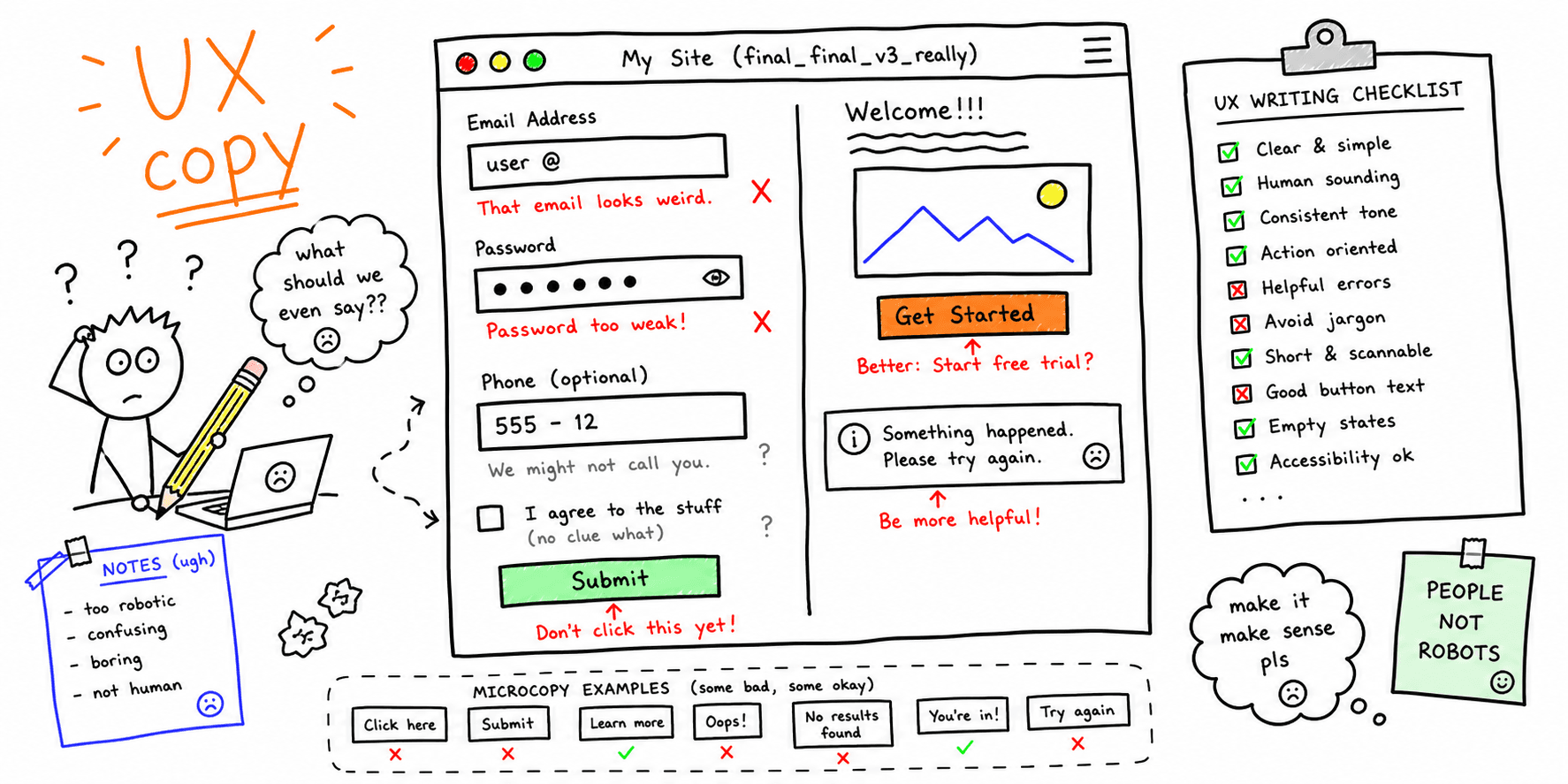

UX writing improves clarity and reduces friction across the UI. Use this checklist to audit microcopy, errors, and calls to action.
What you'll get:
- A UX writing checklist
- A copy/paste audit template
- A short report outline
Use the sections below as building blocks; keep what you need and delete the rest.
If you need brand guardrails, use the voice and tone guide template.
References for this guide are listed at the end.
What is UX writing?
UX writing is the copy inside interfaces that explains actions, guides users, and reflects the brand voice. It helps users complete tasks without confusion and reduces friction in key flows.
When to run a UX writing audit
A writing audit is useful when:
- A redesign or new feature is planned
- Support tickets mention confusion or unclear labels
- Conversions drop without clear design or technical issues
- Multiple teams are writing copy without a shared system
Core UX writing principles
Most UI copy should be:
- Understandable and plain
- Concise and focused on user goals
- Consistent across similar UI elements
- Actionable and clear about next steps
UX writing checklist
Use this checklist to review screens and flows.
Clarity and brevity
- Use simple, familiar words
- Keep sentences short and direct
- Remove unnecessary words and repetition
Consistency and terminology
- Use the same labels for the same actions
- Keep tone consistent across flows
- Align UI copy with brand voice guidelines
Guidance and action
- Make the next step obvious
- Avoid vague CTAs like "Continue" without context
- Use user-focused language (benefit over feature)
Error messages
- Place errors near the field or action
- Explain what went wrong in plain language
- Tell users exactly how to recover
- Avoid blaming language
Notifications and alerts
- Front-load key words in the message
- Keep alerts relevant and timely
- Use consistent patterns for similar messages
Onboarding and first-use
- Explain value quickly
- Reassure users with clear next steps
- Match onboarding claims to marketing promises
UX writing audit template (copy/paste)
Audit brief
| Section | Details |
|---|---|
| Audit goal | What outcome should copy improve? |
| Scope | Pages, flows, and devices |
| Users | Personas or segments |
| Voice rules | Brand tone guidelines |
| Success metrics | Ex: form completion, CTA clicks |
Copy inventory
| Screen | Element | Current copy | Issue | Proposed copy |
|---|---|---|---|---|
| Checkout | Error message | "Invalid input" | Not actionable | "Enter a valid ZIP code" |
Findings log
| Area | Issue | Evidence | Severity | Recommendation |
|---|---|---|---|---|
| Signup | CTA is vague | Heatmap + drop-off | Medium | "Create free account" |
UX writing report outline
- Summary (top 5 copy issues)
- Scope and goals
- Methods and sources
- Findings by severity
- Recommendations and examples
- Next steps
Example (short)
Goal: Increase signup completion.
Scope: Signup and email verification screens.
Top findings:
- Error messages are generic and not actionable
- CTA copy is inconsistent across steps
- Onboarding copy does not clarify value
Next steps:
- Replace generic errors with guidance
- Standardize CTA to "Create free account"
- Add one sentence on value before the form
FAQ
Is UX writing the same as copywriting?
No. UX writing focuses on interface copy that guides users through tasks, while copywriting often focuses on marketing and persuasion.
Do we need a style guide to pass a UX writing audit?
A style guide helps teams stay consistent in tone and terminology across interfaces.
Why prioritize plain language?
Plain language helps users understand content quickly and complete tasks with less friction.
References
- Pagely — UX Writing Checklist
- V. Schipka — UX Writing Checklist
- Frontitude — The UX Writers Checklist 6 Steps For An Efficient UX Writing Workflow
- Nielsen Norman Group — Error Message Guidelines
- GOV.UK — Writing For Gov Uk