Jera Value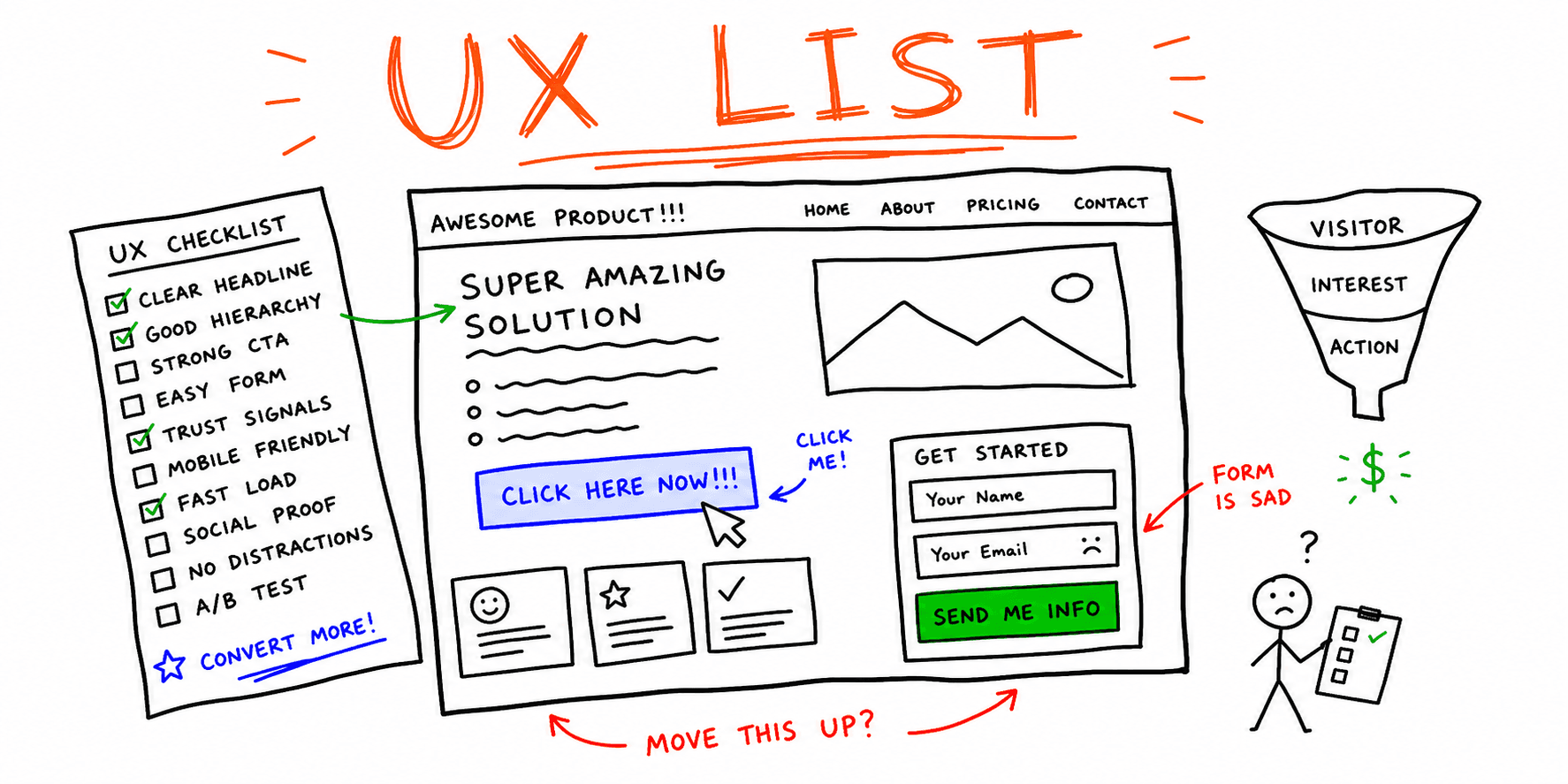

A website UX checklist should do more than list generic UI advice. It should help your team spot friction on high-impact pages, score issues by business impact, and prioritize fixes you can ship this sprint.
This guide gives you:
- a practical ux checklist for website reviews
- a conversion-focused ux design checklist
- a copy/paste scoring template to prioritize fixes
Need a deeper audit workflow? Pair this with UX Audit Template and then run a page-level check with Website UX Audit or Website Design Audit.
When to Use This Checklist vs Other UX Pages
Use this page for quick, conversion-focused page reviews.
Use Website Usability Checklist when your goal is broad usability QA. Use UX Audit Template when you need a full audit report format for stakeholders. Use Website Usability Test when you need user-session evidence, not just expert review.
This split keeps intent clear and reduces overlap between checklist and audit-template content.
30-Minute UX Review Workflow
Run this before major launches, offer changes, or pricing edits.
- Pick one high-value page or flow (homepage, pricing, signup, checkout).
- Score the page with the checklist below.
- Label each issue
P0,P1, orP2. - Assign an owner and due date.
- Re-test after fixes using Website Checker and Site Health Check.
If you are planning bigger UX changes, add Landing Page Structure and Landing Page Analyzer to the same workflow.
Website UX Checklist (30 Checks)
1) Message Clarity and Intent Fit (6)
- Headline states the core value in one sentence.
- Primary CTA appears above the fold.
- Supporting copy answers "who is this for?" quickly.
- One page, one primary intent (no mixed goals).
- Objections are addressed near CTA blocks.
- Section order follows user decision flow.
2) Navigation and Findability (5)
- Menu labels match user language.
- Key pages are reachable in two clicks or less.
- Breadcrumbs/context help users recover from deep pages.
- Internal links point to the next logical step.
- No dead-end pages on core journeys.
3) Trust and Decision Confidence (5)
- Social proof appears near high-intent CTAs.
- Pricing or offer terms are transparent.
- Contact/support paths are visible.
- Policies and guarantees are easy to find.
- Visual hierarchy reinforces credibility.
4) Conversion Flow and Form UX (6)
- CTA labels are specific (not generic "Submit").
- Forms ask only for essential information.
- Validation messages explain how to fix errors.
- Multi-step flows show clear progress.
- Confirmation states set next expectations.
- Tracking events exist on key conversion actions.
5) Mobile and Accessibility Basics (4)
- Tap targets are easy to use on mobile.
- Text and spacing remain readable without zoom.
- Focus states are visible for keyboard users.
- Color contrast supports readability.
6) Performance and UX Stability (4)
- Core templates load quickly on mobile.
- Layout shift does not move CTAs unexpectedly.
- Heavy assets are compressed and lazy-loaded where appropriate.
- Third-party scripts are reviewed for UX impact.
For deeper technical checks, use Core Web Vitals Test, Site Performance Audit, and SEO On-Page Analysis.
UX Design Checklist Template (Copy/Paste)
Use this as your website user experience checklist in Notion, Sheets, or Jira.
| Page/Flow | Check area | Issue found | Severity (P0/P1/P2) | Suggested fix | Owner | ETA | Status |
|---|---|---|---|---|---|---|---|
Severity Rules
P0: blocks task completion or causes major trust loss.P1: high friction on a core conversion step.P2: moderate friction with limited business impact.
Use the same scoring model across teams so this ux design checklist produces consistent decisions.
Priority Matrix (What to Fix First)
Prioritize fixes with this rule:
- High impact + low effort -> ship this sprint.
- High impact + high effort -> scope as next sprint project.
- Low impact + low effort -> batch into cleanup.
- Low impact + high effort -> deprioritize.
If your page-level issues are mostly structural, run Website Navigation Best Practices and Information Architecture Principles before redesign work.
Related Resources
- UX Audit Template
- Website Usability Checklist
- Website UX Best Practices
- Usability Examples
- Website UX Audit
- Website Usability Test
Final Thoughts
A strong website UX checklist should create action, not just observations. Use this checklist on one high-value page at a time, prioritize by impact, and re-test after each release.