Jera Value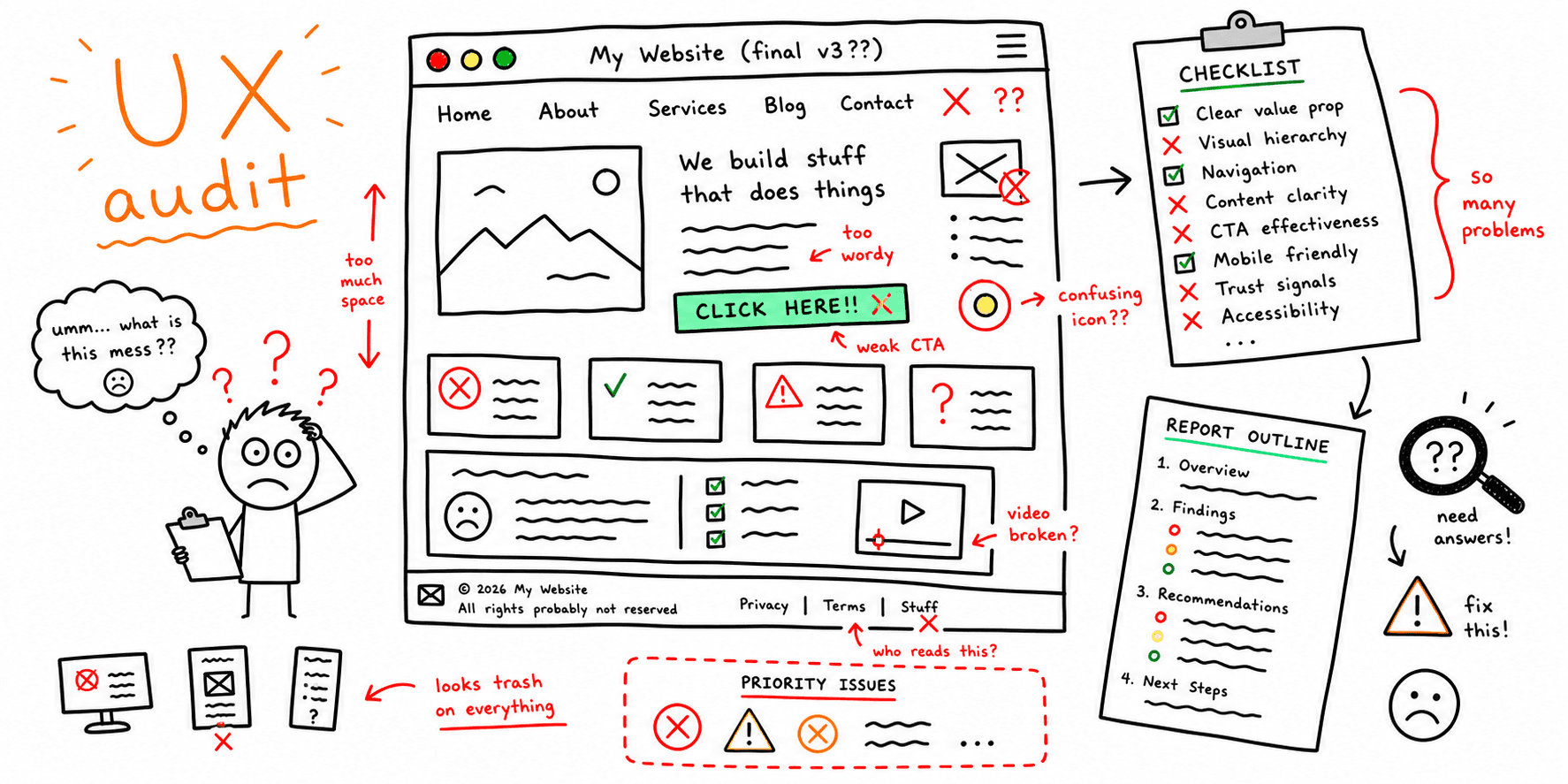

A UX audit reviews the end-to-end experience and pinpoints friction. This template helps you document issues, prioritize fixes, and report clearly.
What you'll get:
- A UX audit checklist
- A copy/paste UX audit template
- A simple report outline
Use the sections below as building blocks; keep what you need and delete the rest.
For a UI-only pass, use the UI audit checklist.
References for this guide are listed at the end.
What is a UX audit?
A UX audit is a structured review of a product to identify usability issues, friction, and gaps in the user journey. It combines expert review with evidence from analytics, user feedback, and usability testing.
When to run a UX audit
UX audits are especially useful when:
- You launch a new feature or redesign
- Conversion or retention drops
- You see repeated negative user feedback
- You need to benchmark against competitors
- New accessibility requirements appear
Core steps in a UX audit
Most audits follow a similar flow:
- Align with stakeholders on goals and scope
- Collect analytics, feedback, and baseline metrics
- Evaluate UI and interactions (heuristics + walkthroughs)
- Research with users (tests, interviews, surveys)
- Analyze findings and patterns
- Build the report with evidence and recommendations
- Share, prioritize, and plan next steps
UX audit checklist
Use this checklist to keep reviews consistent.
Prep
- Define the goal and success metrics
- Set scope (flows, pages, devices)
- Gather analytics, support tickets, and feedback
- Select personas or target segments
Experience review
- Run a walkthrough of key flows
- Check navigation and information architecture
- Review UI consistency and clarity
- Evaluate accessibility basics
- Review forms, errors, and edge cases
Evidence
- Review funnel drop-offs and exit points
- Capture screenshots and examples
- Note severity and user impact
Report
- Summarize findings and patterns
- Prioritize issues by severity
- Provide actionable recommendations
- Define owners and next steps
UX audit template (copy/paste)
Audit brief
| Section | Details |
|---|---|
| Audit goal | What outcome are we trying to improve? |
| Scope | Which flows, pages, or devices are in scope? |
| Success metrics | Ex: activation rate, task success, conversion |
| Target users | Primary personas or segments |
| Constraints | Time, team, tools |
Methods used
- Heuristic evaluation
- Cognitive walkthrough
- Analytics review
- User feedback or testing
Findings log
| Area | Issue | Evidence | Severity | Recommendation |
|---|---|---|---|---|
| Checkout | Shipping step is unclear | Screenshot + 38% drop-off | High | Add inline guidance and progress labels |
Journey summary
- Key blockers:
- Patterns across users:
- Quick wins:
- High-effort fixes:
Recommendations
- Recommendation with expected impact
- Recommendation with expected impact
- Recommendation with expected impact
Next steps
- Owner and deadline for each fix
- Follow-up validation plan
UX audit report outline
A strong report should be easy to scan and backed by evidence.
- Summary (top 5 findings)
- Scope and goals
- Methods and data sources
- Findings by severity
- Recommendations and examples
- Next steps and owners
Example (short)
Goal: Increase signup completion.
Scope: Web signup flow (desktop + mobile).
Top findings:
- Password rules appear after an error (confusing)
- Email verification CTA is below the fold on mobile
- Form labels are inconsistent across steps
Next steps:
- Move password rules above the field
- Pin the verification CTA
- Standardize labels to match user language
FAQ
Is a UX audit the same as usability testing?
No. Audits combine expert review with data and can include usability testing, but they do not replace direct testing.
Do UX audits need heuristics?
Heuristics are a common part of UX audits because they provide a structured way to spot usability issues quickly.
What should a UX audit report include?
Include clear findings, severity ratings, evidence, and recommendations.
References
- Maze — UX Audit
- UXCam — UX Audit
- Eleken — Top Three UX Audit Report Examples And How To Pick The Right One
- Curiosum — Free UX Audit Figma Template
- Adam Fard — UX Audit