Jera Value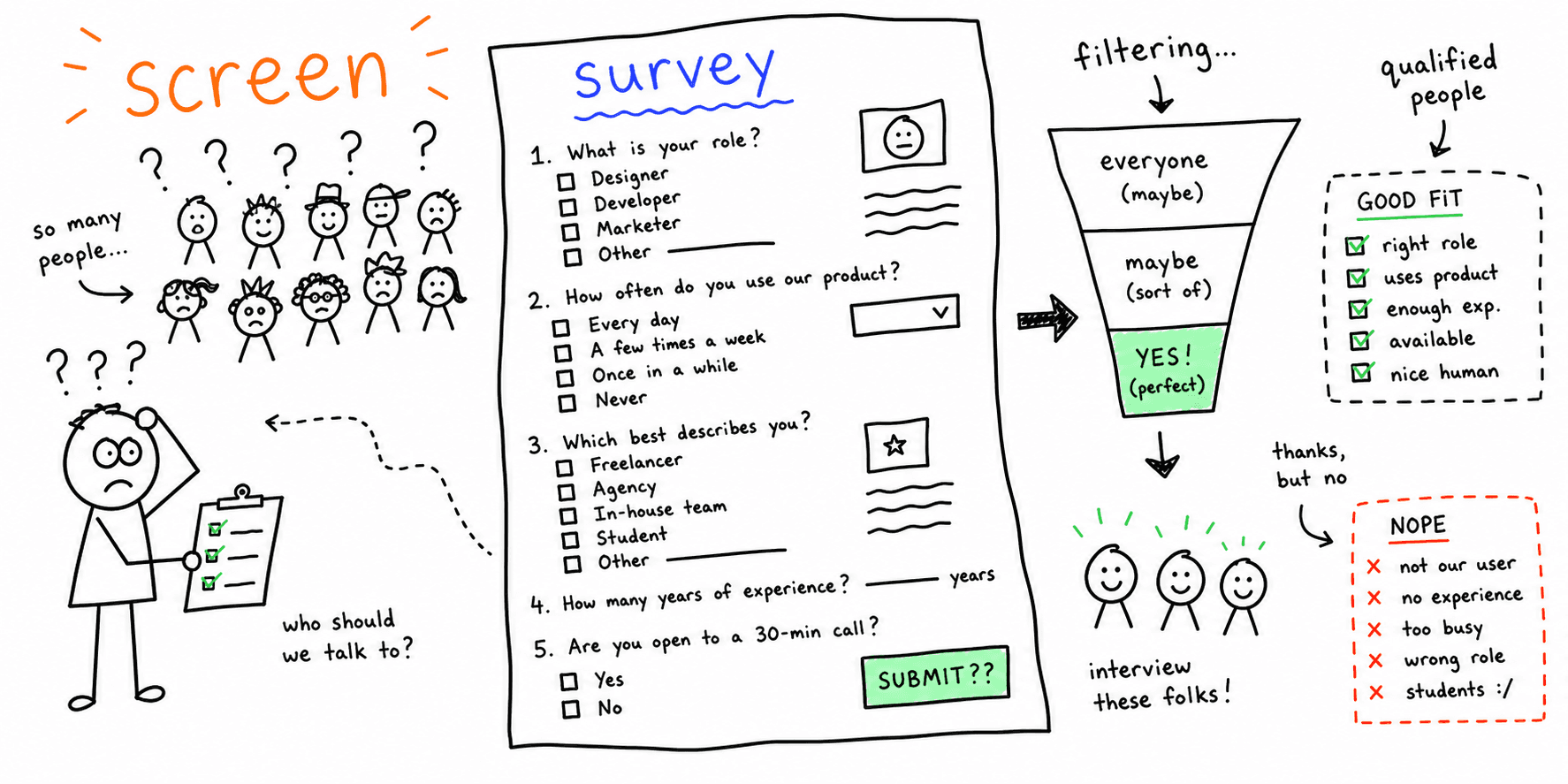

A screener helps you recruit the right participants and avoid noisy data. This template keeps criteria clear and questions concise.
What you'll get:
- A copy/paste screener survey template
- Example screener questions by category
- A checklist and mini example
Use the sections below as building blocks; keep what you need and delete the rest.
After screening, send the UX research consent form template.
References for this guide are listed at the end.
What is a screener survey?
User Interviews defines screener surveys as short questionnaires used before a study to filter out people who do not match your criteria. Nielsen Norman Group describes a screener as questions used to establish fit for a research project.
Why screen participants?
Nielsen Norman Group notes screeners improve relevance, data quality, and save time by avoiding mismatched participants. Lyssna adds that targeted questions help you reach the right people faster.
Screener survey best practices
These practices are consistently recommended across Nielsen Norman Group and User Interviews:
- Define inclusion and exclusion criteria before writing questions
- Focus on past behaviors instead of predictions
- Avoid leading or loaded questions
- Avoid yes or no questions when you can use multiple choice
- Include at least one open-ended question to screen for articulation
- Keep screeners brief (around 10 questions or fewer)
- Order questions to eliminate poor fits early
- Avoid revealing your study purpose or company
- Provide a catchall option like "other" or "none of the above"
- Pilot the screener to catch confusing wording
User research screener template (copy/paste)
Use this structure to create a clear screener with simple pass or fail logic.
1. Study summary (short)
- Study topic: [general topic only]
- Session type: [interview, usability test, diary, etc.]
- Duration: [time]
- Incentive: [amount and timing]
- Location or device: [remote or in-person, device required]
2. Must-have criteria
- Behavior requirement: [past behavior]
- Tool or product usage: [past usage]
- Role or industry: [if required]
3. Disqualifiers
- Conflicts: [competitor employees, internal team, etc.]
- Incompatible devices or locations
- Recent participation in similar studies (optional)
4. Screener questions
Q1. Have you done [relevant behavior] in the past [time period]?
- Never (reject)
- 1-2 times (maybe)
- 3+ times (accept)
Q2. Which tools or services have you used in the past [time period]? (Select all)
- [Tool A]
- [Tool B]
- [Tool C]
- None of the above (reject)
Q3. When was the last time you did [behavior]?
- Within the last week
- Within the last month
- 3-6 months ago (maybe)
- More than 6 months (reject)
Q4. Open-ended articulation check: Please describe the last time you did [behavior].
Q5. Are you comfortable participating in a [recorded] session?
- Yes (continue)
- No (reject if recording required)
Example screener question categories
UserTesting provides sample questions by category. Use these as a starting point and adapt to your study.
| Category | Example question |
|---|---|
| B2B role | What is your job title or role? |
| eCommerce | How often do you shop online for [category]? |
| Travel | When did you last book travel online? |
| Technology | What devices do you own or use regularly? |
| Education | Are you a student, teacher, or administrator? |
Lyssna notes you should keep answer choices clear and non-overlapping, and include "other" options when needed.
Recruitment materials to pair with your screener
The DOE UX templates list includes a recruitment screener and recruitment emails as part of a research kit.
Consider preparing:
- Recruitment email and reminder
- Participant scheduling info
- Consent to record form (if applicable)
Analysis checklist
- Confirm inclusion and exclusion criteria are clear
- Review answers for past behaviors, not predictions
- Remove leading or biased phrasing
- Check that questions are ordered to filter early
- Pilot the screener with 1-2 teammates
Mini example (filled in)
Study: Checkout usability test for an ecommerce site
Must-have: Bought clothing online in the last 30 days
Disqualifier: Works in UX or ecommerce for a competitor
Open-ended: Describe the last online purchase you made
FAQ
How long should a screener survey be?
User Interviews recommends keeping screeners brief, around 10 questions or fewer.
What should I screen for first?
User Interviews recommends ordering questions to remove poor fits early, like location or device requirements.
How do I avoid participants gaming the screener?
Nielsen Norman Group recommends avoiding yes or no questions and using past behavior questions to reduce guessing.
References
- User Interviews — Screener Surveys
- Nielsen Norman Group — Screening Participants
- UserTesting — Screener Questions Samples
- Lyssna — UX Screener Questions
- U.S. Department of Energy — User Experience Research Templates And Examples
Related resources
- UX research plan template
- User interview template
- Usability testing script template
- UX research consent form template
- Diary study template
If you want a fast UX review for a specific page, start here: Website UX Audit
Want client-ready UX findings in minutes? Roast My Web generates branded PDF audit reports with prioritized UX, conversion, and SEO fixes.