Jera Value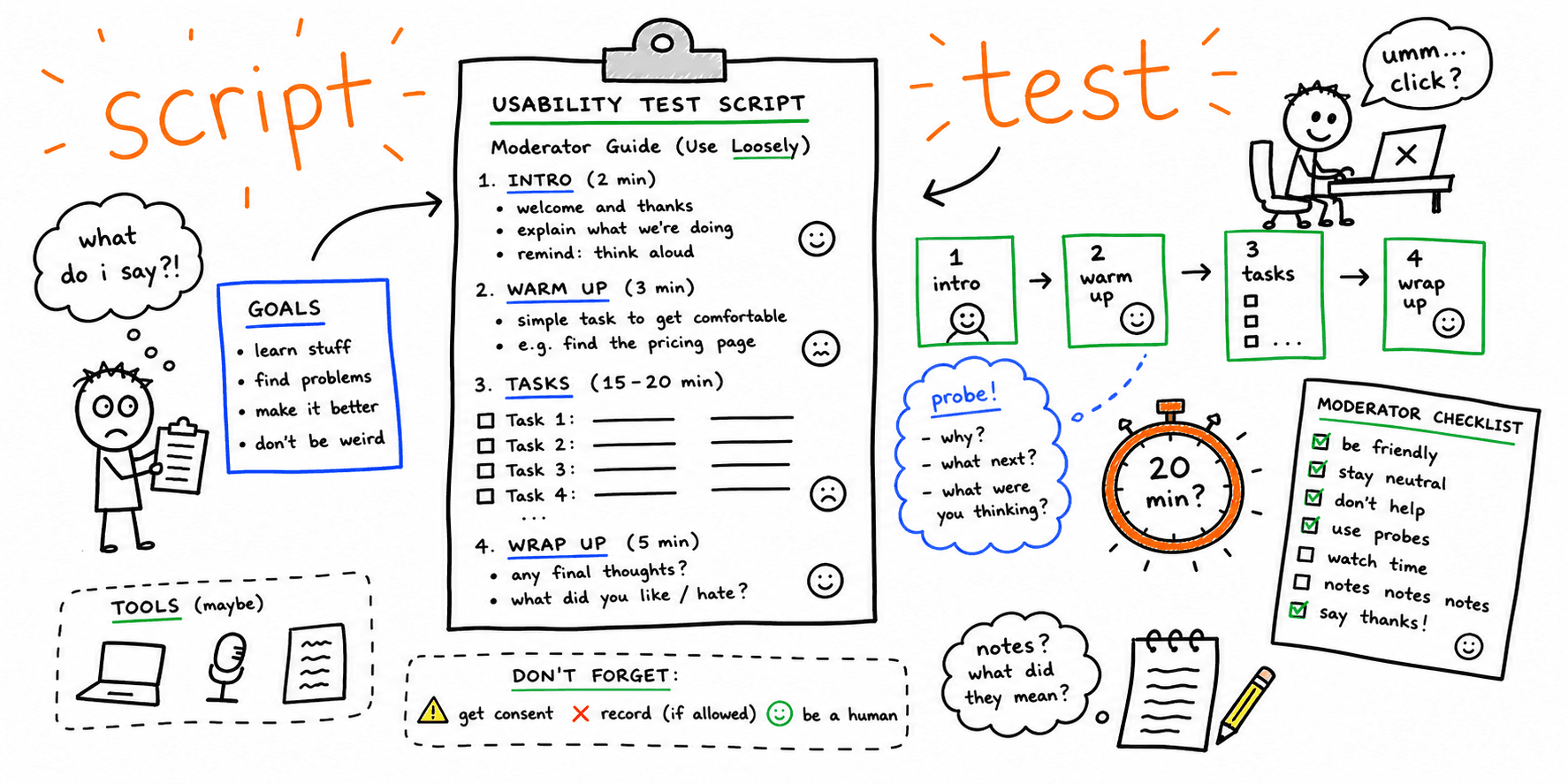

A clear script keeps usability sessions consistent, reduces moderator bias, and gives your team findings you can actually ship.
This guide gives you a practical usability test script example you can run today, plus an editable usability testing script template for your own workflow.
What you'll get:
- A 30-minute usability test script example (copy/paste)
- An editable usability test script template
- Prompt examples that avoid leading questions
- A note-taking sheet and severity rubric
Use this with:
- How to conduct usability testing for end-to-end setup
- Usability testing template for study plans and reports
- Website usability checklist for quick page reviews
References for this guide are listed at the end.
Script vs. test plan template (avoid mixed intent)
Use this page when you need what to say in-session: intro lines, task prompts, and neutral follow-ups.
If you need a usability test plan template (goals, participant criteria, metrics, logistics, report format), use the usability testing template. Keeping script and planning artifacts separate makes sessions cleaner and findings easier to compare.
What is a usability test script?
A usability test script is the set of lines, prompts, and task instructions a moderator uses during a session. The goal is consistency: every participant gets the same framing and task prompts, so your findings are comparable.
When to use this usability test script example
Use this script when you need to diagnose friction in a high-value flow, such as:
- Signup or trial activation
- Checkout and payment
- Lead form or demo booking
- Navigation to pricing/features
Usability test script example (30-minute moderated session)
0:00-2:00 Introduction and consent
Use this exact wording:
Hello, thanks for joining today. My name is [Name], and I work on [Team].
We are testing the product, not you. There are no wrong answers.
The session will take about [Time] minutes.
We would like to record this session for research purposes. Do we have your consent?
If you need a break at any time, let me know.
Please think aloud as you work. This helps us understand your experience.
2:00-5:00 Warm-up questions
- What is your role and what are your main responsibilities?
- How often do you do [task or workflow]?
- What tools do you use today?
5:00-22:00 Task block
Use goal-based tasks, not UI instructions.
| Task | Scenario prompt (copy/paste) | Success signal | Follow-up prompt |
|---|---|---|---|
| Task 1 | "You need to compare plans and decide which one fits a 20-person team. Show me what you would do." | Participant reaches pricing details and selects a plan | "What information is missing for your decision?" |
| Task 2 | "You want to start a free trial now. Please do that as you normally would." | Participant starts trial flow without help | "What almost stopped you?" |
| Task 3 | "You need to confirm this tool works with your stack. Find that information." | Participant locates integrations/docs quickly | "What did you expect to see earlier?" |
22:00-27:00 Debrief questions
- What felt easy?
- What felt confusing?
- What would you change first?
- How confident are you that you could complete this on your own next time? (1-5)
27:00-30:00 Wrap-up and close
Thank the participant, confirm incentive/payment, and explain next steps.
Usability testing script template (editable)
1) Intro and consent
Hi [Name], thanks for joining.
Today we are evaluating [product/page], not your performance.
Session length: [30-45 minutes].
Recording consent: [yes/no].
Please think aloud while you complete tasks.
2) Context questions
- What are you trying to accomplish in tools like this?
- How do you currently solve this problem?
- What matters most when choosing a solution?
3) Task prompts (3-5 tasks)
Task [1]: [goal-based scenario]
Task [2]: [goal-based scenario]
Task [3]: [goal-based scenario]
4) Probing prompts (use neutrally)
- What are you thinking right now?
- What did you expect to happen?
- What would you do next if I were not here?
5) Wrap-up
- What was most confusing?
- What gave you confidence?
- What one change would improve this flow most?
Usability testing moderator script prompts (by session moment)
Use these prompts to keep your usability testing moderator script neutral and consistent.
| Session moment | Prompt you can read verbatim |
|---|---|
| Participant hesitates | "What are you hoping to find at this step?" |
| Participant asks for help | "What would you try next if I were not here?" |
| Participant clicks randomly | "What result were you expecting from that action?" |
| Participant finishes task fast | "What made this step feel easy?" |
| Participant struggles repeatedly | "What almost made you stop?" |
Moderator do/don't rules
- Do ask neutral follow-up questions
- Do pause long enough for the participant to think
- Do keep wording identical across sessions
- Do not teach the interface mid-task
- Do not name the correct button or location
- Do not explain intent before the participant acts
If you need platform options for remote runs, use website usability testing software.
Note-taking worksheet + severity rubric
| Field | Notes |
|---|---|
| Participant | |
| Task | |
| Success or failure | |
| Time on task | |
| Observations | |
| Quotes | |
| Issues and severity |
Severity scale (for faster prioritization)
| Severity | Meaning | Shipping priority |
|---|---|---|
| P0 | Blocks task completion | Fix this sprint |
| P1 | Major friction on key path | Fix this sprint |
| P2 | Noticeable friction but recoverable | Schedule next sprint |
| P3 | Minor clarity/copy issue | Batch with content cleanup |
Filled usability test script example (B2B pricing flow)
Study goal: Validate whether first-time visitors can find pricing, compare plans, and start a trial without help.
Participant profile: Marketing manager at a SaaS company (10-50 employees).
Top issue found:
- Users looked for annual discount details near plan names.
- Information was hidden behind FAQ links.
- Recommendation: place annual savings callout directly in plan cards.
This is where a website UX audit can help you identify structural issues before rerunning sessions.
Analysis checklist
- Review notes per task and participant
- Identify common failure points
- Capture quotes that explain why
- Rank issues P0-P3
- Assign owner and ETA per issue
- Re-test the same tasks after release
FAQ
How many users do I need for this usability test script example?
For most website studies, 5 to 8 participants per user segment is enough to expose the highest-impact issues.
What is the difference between a usability test script and a test plan template?
A script is what you say during the session.
A test plan defines goals, participants, and metrics before sessions begin.
Use this guide with the usability testing template.
Can I use this as an unmoderated usability testing script?
Yes. Convert moderator lines into on-screen instructions, then remove live probes and add post-task questions.
How long should a usability test session be?
30 to 45 minutes is a practical range for moderated sessions when testing 3 to 5 tasks.
How many tasks should I include?
Keep it focused: 3 to 5 realistic tasks is usually enough.
Where should I start if I need quick page-level findings first?
Run a website usability test to identify major UX risks, then validate fixes with moderated sessions.
References
- Maze — Script
- Lyssna — Usability Test Script
- Columbia University — Usability Testing Script
- GitLab — Writing Usability Testing Script
- User Interviews — Usability Testing Templates Checklists
Related resources
- How to conduct usability testing
- Usability testing template
- Website usability checklist
- Website usability testing software
- UX research plan template
- User interview template
- Heuristic evaluation template
Need a fast baseline before running live sessions?