Jera Value

The Short Answer
My Web Audit, MySiteAuditor and Roast My Web all make audit reports that agencies send to prospects and clients, but they do different jobs. My Web Audit is a monthly plan with many report types, monthly client reports and lead widgets for your own website. MySiteAuditor is a monthly SEO audit tool built around audit forms that you embed on your website to collect leads. Roast My Web reviews one page in seven areas and shows the proof behind each finding. You edit the report before you send it, and you pay with one-time credit packs.
Choose My Web Audit or MySiteAuditor if you want leads from a form on your own website, a check of more than one page, or a recurring plan. Choose Roast My Web if you want a design, UX, copy and conversion review of one page that you edit before the client sees it. It also fits if you want to pay per report. Some agencies use more than one tool.
What We Checked, and When
Roast My Web is our product, so read this comparison with that in mind.
On October 20, 2026, we read the public pages of both competitors: the My Web Audit pricing page, and the MySiteAuditor homepage and pricing page. We did not open a trial account in either tool, run the same page through all three tools, or check any customer results. So the facts about My Web Audit and MySiteAuditor in this post are what their own pages said on October 20, 2026. Prices and features change, so check their pages before you decide.
My Web Audit and MySiteAuditor are two separate products. The names are similar, and search results often mix them up.
Roast My Web vs My Web Audit vs MySiteAuditor
| What you compare | Roast My Web | My Web Audit (October 20, 2026) | MySiteAuditor (October 20, 2026) |
|---|---|---|---|
| Main job | A review of one page for design, UX, originality, copy, conversion, mobile and SEO | Audits, monthly client reports and lead capture for agencies | SEO audit reports and embedded lead forms for SEO agencies |
| Report types | One report type in seven areas | 10 audit types, including website, landing page, on-page SEO, Google Business Profile, e-commerce and accessibility | One SEO report that checks over 50 SEO signals for one target keyword |
| More than one page | No. One public page per audit, and no site crawl | The on-page SEO audit can add extra URLs for 2 credits each | Site Crawl finds and audits up to 10 pages |
| Proof behind findings | Each finding shows a quote from the page, a measured value or a marked screenshot | Not checked | Not checked |
| Human input | Automated. You edit the report before you send it | Some reports with areas such as design and UX need your own manual review in its app or Chrome extension | Not checked. A report takes about 15 seconds |
| Branding | Logo, company name, website, brand color, report title and your own button | White-label reports. A custom report domain only on the Agency plan | Your logo, colors and contact details on forms and reports |
| Lead capture on your site | None | Lead widgets and lead magnets | Embedded audit forms, on the Professional plan only |
| Price model | One-time packs: $4 for 6 audits, $12 for 24 and $299 for 1,200. No subscription | Monthly plans from $69.99 to $199.99, with 50 to 200 credits a month. Unused credits do not carry over | $49 a month (Starter) or $79 a month (Professional), with unlimited reports |
| Trial or refund | No free plan. You can ask for a refund of your first purchase within 30 days | Seven-day free trial with no card. Seven-day money-back guarantee for new accounts | 14-day satisfaction guarantee |
What My Web Audit Does
My Web Audit sells three monthly plans for agencies. On October 20, 2026, Pro cost $69.99 a month for 50 credits. Studio cost $129.99 a month for 100 credits, and Agency cost $199.99 a month for 200 credits. Annual billing costs $700, $1,300 or $2,000 a year and gives 50% more credits. The credits of a plan must be used within 30 days, and unused credits do not carry over. Each audit type uses a fixed number of credits. A website audit or a landing page audit uses 6, an on-page SEO audit uses 4, and an AI visibility audit uses 20. A re-run uses the same credits as a new audit.
The plans also include things that are not audits. Pro includes monthly reports for up to 3 clients, with data from Google Analytics, Search Console and Google Business Profile. It also includes lead magnets and lead widgets for your website, and integrations with HighLevel, Zapier and Make. Reports open as a web page, a PDF or a Google Docs file, in 8 languages, and you can add your own audit points. A custom white-label domain is only on the Agency plan, but annual Pro users can show audits on a shared domain, growthinsights.co.
My Web Audit's pricing page also says that its audits are not all automated. Some reports have areas such as design and UX that need your own manual review in its app or Chrome extension.
What MySiteAuditor Does
MySiteAuditor calls itself a lead generation and sales tool for SEO service providers. Its main feature is an audit form that you embed on your own website, in a large, slim or small size. A visitor enters a page address, gets an SEO report, and you get a new lead. You can also run reports from the dashboard and use them in sales meetings.
Each MySiteAuditor report takes about 15 seconds and checks over 50 SEO signals to show how well a page is optimized for one keyword. Every report also checks whether robots.txt blocks AI crawlers such as GPTBot and ClaudeBot, and whether the site has an llms.txt file. A Site Crawl feature finds up to 10 pages from the sitemap or the internal links, and then audits each page. Reports carry your logo, colors and contact details, and you can email, download or print them as PDFs. The tool is available in 20 languages.
On October 20, 2026, MySiteAuditor had two plans. Starter cost $49 a month, or $490 a year, and gave unlimited SEO audits that you start yourself, with your branding, but no embedded forms. Professional cost $79 a month, or $790 a year, and added unlimited embedded forms and automatic lead capture. It also added conversion tracking, CRM integrations such as Zapier and Mailchimp, and GDPR options. Both plans list a 14-day satisfaction guarantee.
What They Do That Roast My Web Does Not
Be clear on these differences before you choose, because Roast My Web cannot do these jobs.
Leads from your own website. Both competitors let you put a form or widget on your website that turns visitors into leads. Roast My Web has no widget, embed or lead form. You run each audit yourself and send the report.
More than one page in one run. MySiteAuditor's Site Crawl audits up to 10 pages at once. The My Web Audit on-page SEO audit can add extra URLs. Roast My Web audits one public page per credit and does not crawl a site.
Recurring plans and monthly client reports. Both competitors sell monthly plans. My Web Audit also sends monthly client reports with Google Analytics, Search Console and Google Business Profile data. Roast My Web sells only one-time packs, has no monthly reports and does not read analytics.
Other report types and checks. My Web Audit has Google Business Profile, accessibility, competitor and ROI audits. MySiteAuditor checks a page for one target keyword and checks AI crawler rules and llms.txt. Roast My Web does none of these.
Unlimited reports for one price. MySiteAuditor plans include unlimited reports. With Roast My Web, each audit uses 1 credit.
What Roast My Web Does Differently
This section describes Roast My Web only. We did not check whether My Web Audit or MySiteAuditor offer the same things.
A review of copy, UX and conversion, not only SEO. Each Roast My Web audit scores seven areas: design, UX, originality, copy, conversion, mobile and SEO. The report ranks the fixes by impact and labels them Do first, Plan it or Nice to have. Many fixes come with suggested wording.
Proof that holds up in a client meeting. Every finding shows its proof: a quote from the page, a measured value or a marked screenshot. Roast My Web checks the proof and drops findings whose proof does not hold up.
A report that you edit before anyone sees it. You can rewrite a finding, change its priority or delete it. You can also remove its proof, upload your own screenshot and add advice that only you know. Roast My Web sends nothing automatically.
Payment per report. Roast My Web audits one public page per credit, and credits come in one-time packs with no subscription. If an audit fails, the credit comes back.
Screenshots, speed and search numbers. Each report also includes desktop and phone screenshots and a speed test on a phone. It also shows site numbers from an SEO data provider, such as domain rank, backlinks and estimated visits a month.
What One Report Costs
These examples use the prices on the three pricing pages on October 20, 2026. Each cost per report assumes that you use every credit that you pay for. For MySiteAuditor, where reports are unlimited, the example assumes 8 reports a month, so the price per report falls as you run more.
| Tool and plan | Price | What the price buys | Cost per report |
|---|---|---|---|
| My Web Audit Pro, billed monthly | $69.99 a month | 50 credits a month, or 8 website audits at 6 credits each | About $8.75 |
| My Web Audit Pro, billed annually | $700 a year | 75 credits a month, or 12 website audits at 6 credits each | About $4.86 |
| MySiteAuditor Starter | $49 a month | Unlimited SEO reports, no embedded forms | About $6.13 |
| MySiteAuditor Professional | $79 a month | Unlimited SEO reports and embedded lead forms | About $9.88 |
| Roast My Web Solo pack, one time | $4 | 6 credits, or 6 page audits | About $0.67 |
| Roast My Web Startup pack, one time | $12 | 24 credits, or 24 page audits | $0.50 |
| Roast My Web Agency pack, one time | $299 | 1,200 credits, or 1,200 page audits | $0.25 |
These numbers compare the price of one report, not its value. The three reports check different things, and the monthly plans include lead forms, client reporting and other features that Roast My Web does not have. If you need those features, a lower price per report does not make Roast My Web a replacement.
How a Prospect Audit Works in Roast My Web
A Roast My Web audit has four steps, from the page address to the report that the client opens:
- Paste the prospect's page. You can paste several URLs at once, and each one becomes its own audit.
- Read the draft a few minutes later: scores, ranked fixes, proof, and desktop and phone screenshots.
- Edit each finding that does not fit the client's business.
- Add your branding, then share a web report link or send the PDF.
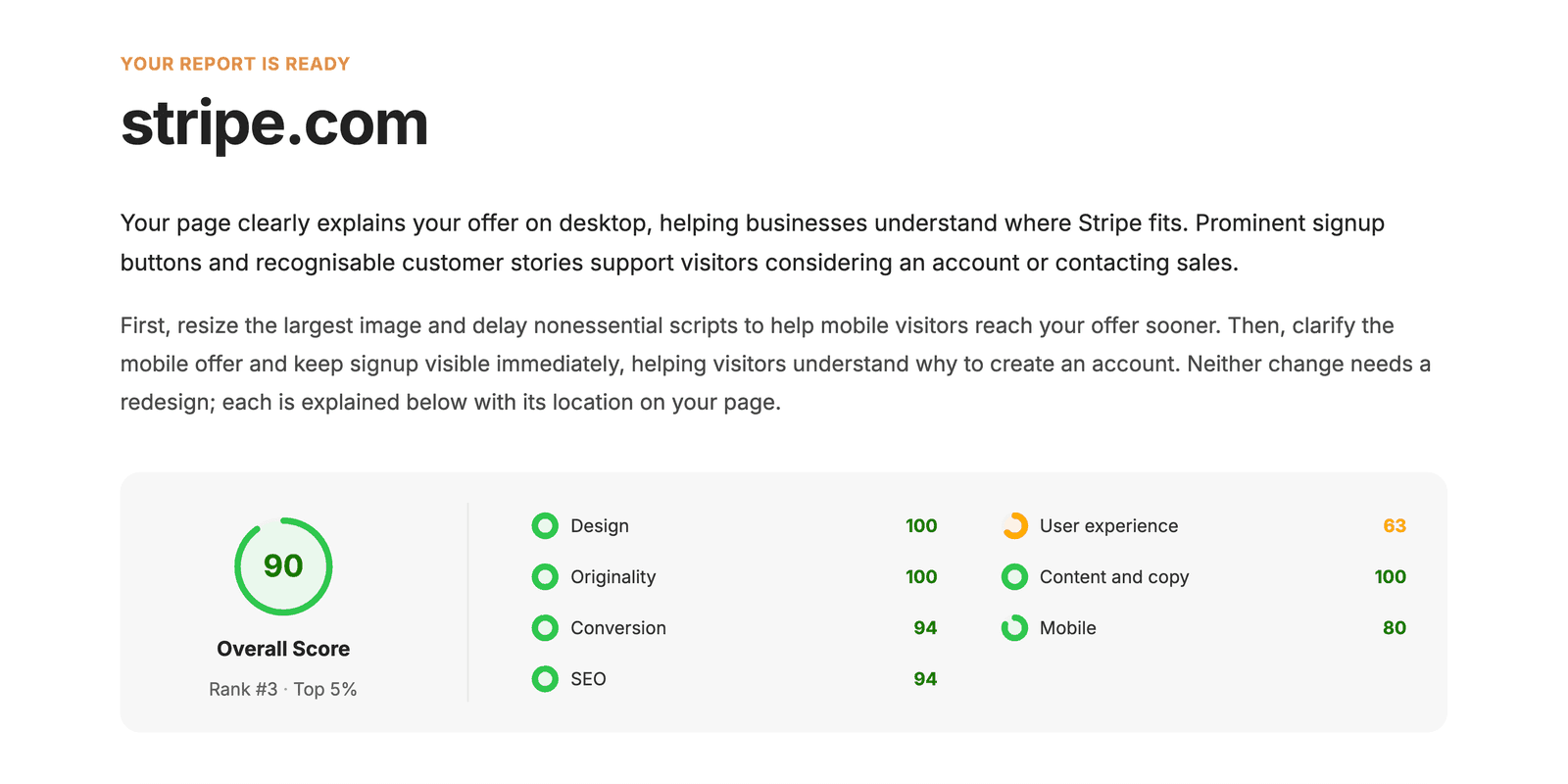
Our annotated Stripe sample report shows these steps on a real Roast My Web audit of the stripe.com homepage. In that report, Roast My Web found no phone link, email link or form on the page and marked the change as Do first. The measurement was correct, but the advice did not fit Stripe. Stripe sends sales enquiries to a Contact sales page, and the header and the phone menu link to it.
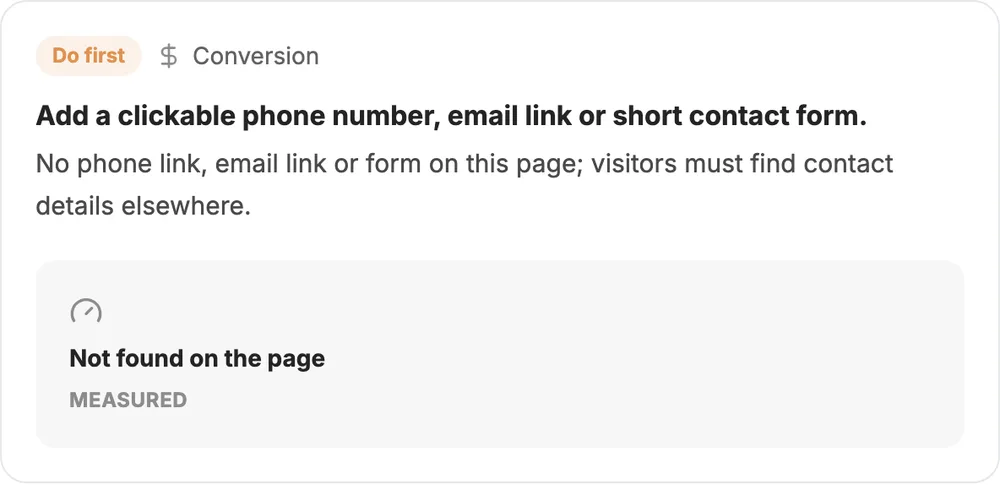
So before we send that report, we would open the finding in the report editor and change its priority from Do first to Nice to have. We would also rewrite what the report saw and what to change, so that the finding names the Contact sales page. The shared web report and the PDF then show the edited finding. The sample post shows the full edit, field by field, and you can open the full Stripe report as Roast My Web generated it.
The branding step comes next. In Branded Report Options, add your logo, company name, website, brand color, report title and subtitle. You can also add your own button, such as "Book a call". Then share the report. With the neutral address on, new shared links open on audits.page, and the page there shows no Roast My Web name. The PDF carries your branding too, but the button appears only on the web report. The white-label website audit page shows the branded report, and the client work page shows how agencies and freelancers use it.
What Roast My Web Does Not Do
Roast My Web has clear limits, so check them before you switch. Roast My Web has no lead widget, embed or lead form for your website. It does not crawl a site: each audit covers one public page. It sells no recurring plans and sends no monthly client reports.
Roast My Web also does not check broken links, redirects or status codes, read your analytics, or show where visitors leave the page. It measures speed on a phone only. It does not check Google Business Profile or local listings, check AI crawler rules or llms.txt, run a legal accessibility audit, or fix and rebuild sites. For a technical crawl of a whole site, use a crawler next to Roast My Web. Our website audit tools comparison covers crawlers.
FAQ
Is Roast My Web a full replacement for My Web Audit or MySiteAuditor?
No, not for every job. Roast My Web covers one part of agency audit work: a review of a prospect's or client's page, and a branded report that you edit and send. It does not replace lead forms on your website, a site crawl, monthly client reports or the other report types of My Web Audit and MySiteAuditor.
Is there a free plan or trial?
Roast My Web has no free plan and no timed trial. Open the sample reports first: the Stripe sample report shows a full report with our notes. If the output fits your work, buy a small pack, such as 6 audits for $4. You can ask for a refund of your first purchase within 30 days, before you use a material part of the credits, under the terms of service.
Will my client see the Roast My Web name?
Not if you set your branding first. Until you save your own branding, the PDF shows Roast My Web's name and website. With the neutral address on, shared links open on audits.page with no Roast My Web name on the page.
How does My Web Audit compare with Semrush for agency website audits?
We have not compared those two. Semrush's Site Audit is a crawler that checks the technical health of many pages. A prospect report answers a different question: what should this business change first, and why. Roast My Web answers that question one page at a time.
Can I audit more than one page?
Yes. Paste several URLs, and each one runs as its own audit, at 1 credit per page. Roast My Web does not crawl the site, so choose the pages that matter most: for example, the homepage, a service page and the contact page.