Jera Value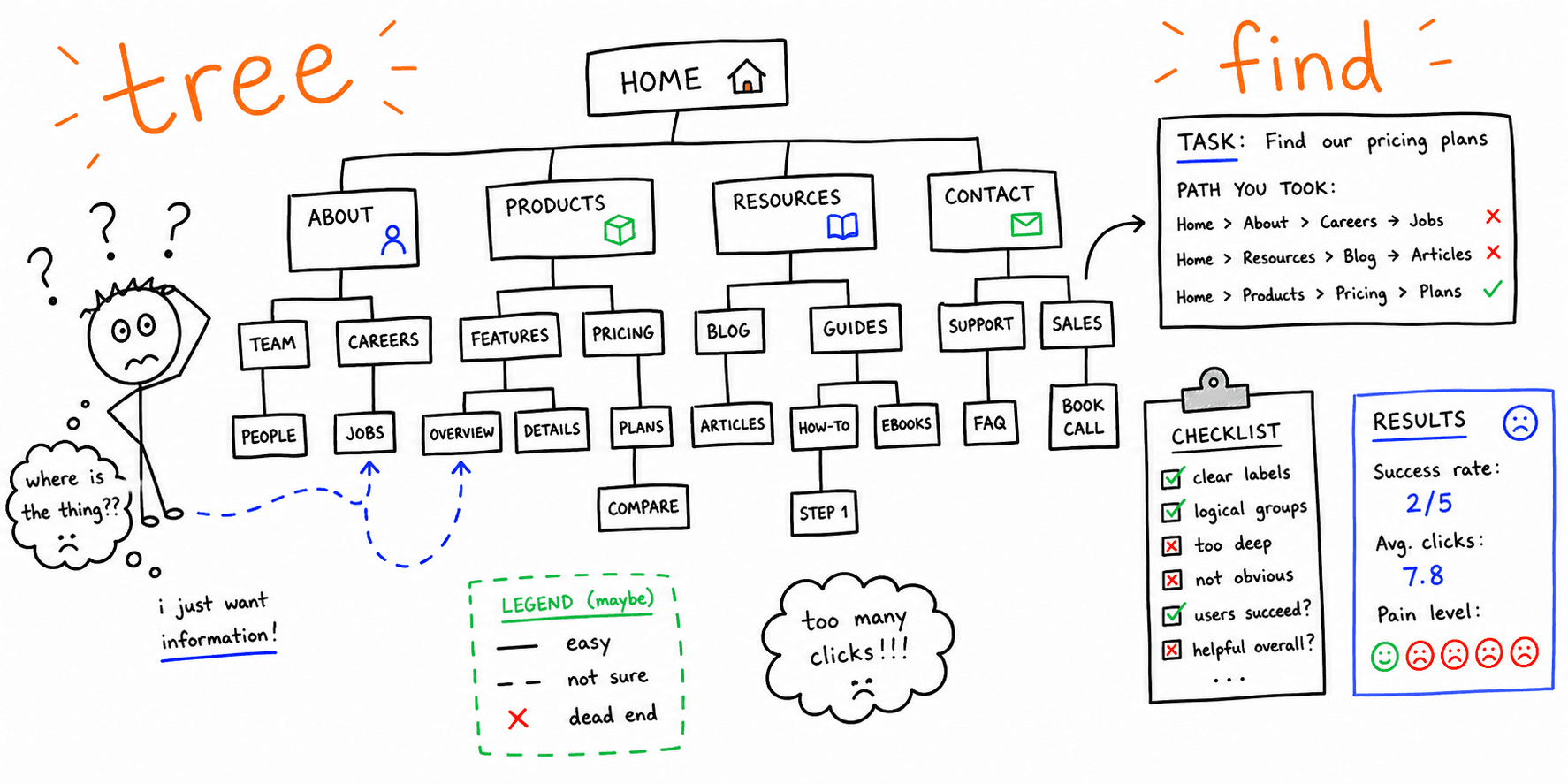

Tree testing validates your information architecture before you touch the UI. This template helps you build tasks, run the test, and interpret results.
What you'll get:
- A copy/paste tree testing template
- Task-writing rules and examples
- A simple analysis checklist
Use the sections below as building blocks; keep what you need and delete the rest.
Tree testing pairs well with the card sorting template.
References for this guide are listed at the end.
What is tree testing?
Tree testing evaluates a navigation hierarchy by asking participants to find items in a text-only tree. It measures findability without the influence of layout or visual design.
When to use tree testing
Tree testing is useful when you need to:
- Validate category labels before designing UI
- Compare two navigation structures
- Benchmark existing information architecture
Tree testing vs card sorting
Card sorting helps you discover how users group content. Tree testing validates whether users can find items in a proposed structure.
Tree testing template (copy/paste)
1. Research goals
- What decision will this test inform?
- What labels or categories are in question?
- What user segment are we testing?
2. Tree structure
- Top-level categories:
- Subcategories:
- Leaf items (targets):
Optimal Workshop recommends building the tree in a spreadsheet so it is easy to edit and import.
3. Tasks
- Task 1:
- Task 2:
- Task 3:
Avoid using exact label terms in tasks. Nielsen Norman Group recommends scenario-based wording so you do not give away the answer.
4. Correct answers
For each task, define the correct destination in the tree.
5. Participant plan
- Target users:
- Sample size:
- Moderated or unmoderated:
6. Metrics
- Success rate
- Directness (first click accuracy)
- Time on task
Task-writing rules (quick)
Use these to avoid bias.
- Do not include the exact label in the task
- Keep tasks short and specific
- Use a real-world scenario
Tree testing worksheet
| Task | Correct location | User path | Success (Y/N) | Time | Notes |
|---|---|---|---|---|---|
Analysis checklist
- Review success rate by task
- Check first-click accuracy
- Identify labels with low findability
- Compare paths across users
- Prioritize labels to rename or regroup
Mini example (filled in)
Goal: Validate navigation for a SaaS help center
Task: "Find instructions to reset your account password"
Correct location: Support > Account > Password reset
Finding: Many users first clicked Billing, suggesting label confusion
FAQ
Should tree testing be moderated?
Nielsen Norman Group notes that unmoderated tests are common for quantitative results, but moderated pilots help clarify confusing tasks.
When should you test multiple trees?
If you are comparing different label sets or structures, run separate tree tests and compare results.
Can you test only part of a site?
Yes. Optimal Workshop notes that you can use a section as the root of your tree if you only want to test part of the IA.
References
- Nielsen Norman Group — Tree Testing
- Maze — Tree Testing
- UserTesting — Tree Testing
- Optimal Workshop — Build Your Tree
- Lucid — Card Sorts
Related resources
- Card sorting template
- Information architecture principles
- Website navigation best practices
- Usability testing template
- UX audit template
If you want a fast UX review for a specific page, start here: Website UX Audit
Want client-ready UX findings in minutes? Roast My Web generates branded PDF audit reports with prioritized UX, conversion, and SEO fixes.