Jera Value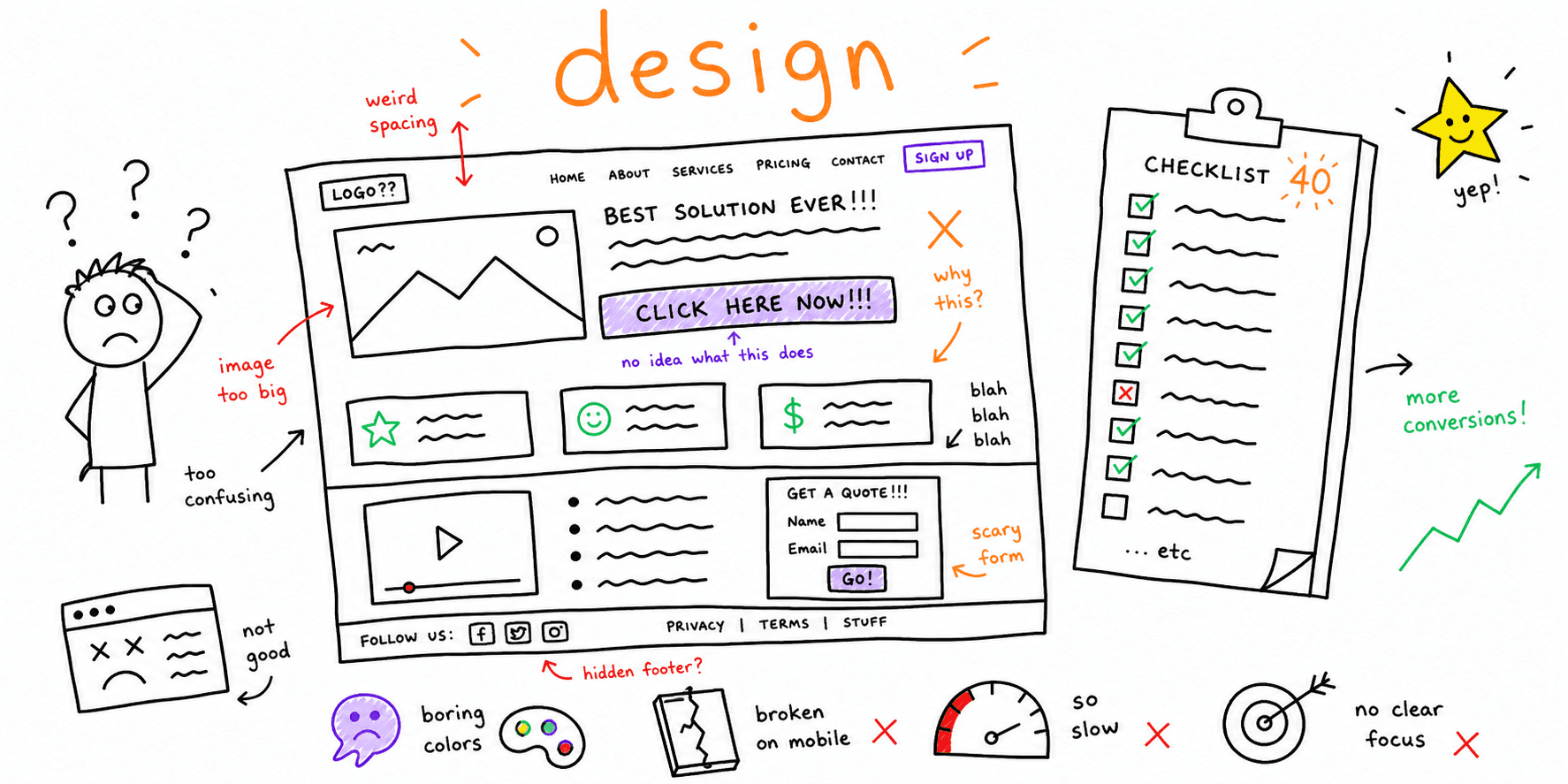

If you need a practical website design checklist, use this page to review what users see and click first: hierarchy, spacing, CTAs, trust blocks, and form clarity.
Start with a page-level scan in Website Design Audit. If the issue is flow-level friction (not visual design), run Website UX Audit.
What this page covers
This checklist focuses on design execution on live pages:
- visual hierarchy
- readability and spacing
- CTA and interaction clarity
- trust placement near decisions
- mobile-first layout quality
For navigation architecture, use Website Navigation Best Practices. For usability testing scripts and question banks, use How to Conduct Usability Testing.
Website design checklist template (copy/paste)
Use this website design checklist template in Notion, Sheets, ClickUp, or Jira:
| Area | Check | Score (0-2) | Severity (P0-P2) | Owner | Fix date |
|---|---|---|---|---|---|
| Above the fold | Value proposition clarity | ||||
| Hierarchy | Headline and CTA contrast | ||||
| Forms | Field labels and errors | ||||
| Mobile | Thumb reach + tap targets | ||||
| Trust | Proof near CTA blocks |
Scoring:
0: fails (confusing or blocking)1: partially works (friction present)2: clear and conversion-ready
40-point website design checklist
1) Above-the-fold clarity
- Headline states who the page is for and the core outcome.
- Subheading removes the biggest objection in one sentence.
- Primary CTA is visible without scrolling on desktop and mobile.
- Hero image supports the message (not decorative noise).
- One primary goal exists for the page.
2) Visual hierarchy and readability
- H1, H2, and body type sizes create a clear scan path.
- Body line length is readable (no long wall-of-text columns).
- Section spacing follows a consistent rhythm.
- Color contrast supports readability in all key blocks.
- Important content appears above less-critical content.
3) CTA and interaction design
- Primary CTA copy is action-specific (not vague).
- Secondary CTA does not compete visually with the primary.
- Button styles are consistent across templates.
- Hover/focus/active states are visible and predictable.
- CTA placement aligns with decision moments (after proof, before exit).
4) Trust and decision support
- Testimonials are specific and near high-intent CTA sections.
- Case-study links are easy to find from sales pages.
- Pricing context is clear before form submission.
- Guarantees/policies are linked near commitment points.
- Contact/help path is visible when users hesitate.
5) Forms and conversion components
- Forms request only essential information.
- Labels are explicit and examples are provided where needed.
- Inline validation explains how to fix each error.
- Multi-step forms show progress and expected effort.
- Success states explain what happens next.
6) Mobile-first design QA
- Tap targets are usable with one thumb.
- Sticky elements do not hide CTA or form fields.
- Font sizes stay readable without zoom.
- Layout remains stable while media loads.
- Mobile CTA path has no dead-end steps.
7) System consistency
- Card, button, and input patterns match the design system.
- Icon style and stroke weight are consistent.
- Heading capitalization rules are consistent.
- Reusable sections use the same spacing and alignment tokens.
- Legacy page styles were not mixed into new templates.
8) Performance and accessibility design checks
- Images are compressed to match rendered dimensions.
- Decorative media does not delay first meaningful content.
- Focus order follows visual order.
- Color is not the only indicator for state and status.
- Motion effects can be disabled and do not block interaction.
Need a technical pass after design QA? Pair this checklist with Core Web Vitals Test, Technical Website Audit, and Website Checker.
Website design checklist for clients
This website design checklist for clients keeps handoffs objective and reduces subjective feedback loops.
Client handoff format
- Page reviewed:
- Business goal:
- Current conversion path:
- Total score (out of 80):
- P0 issues:
- P1 issues:
- Proposed fixes this sprint:
- Metrics to monitor after release:
Recommended review cadence
- Weekly: homepage, top landing page, and one high-intent service page.
- Monthly: full template family sweep.
- Quarterly: redesign debt review and style-system cleanup.
30-minute website design review workflow
- Pick one conversion page and define one primary action.
- Run the 40-point checklist and score each item quickly.
- Flag every
0as immediate fix candidates. - Group issues by effort (quick wins vs structural fixes).
- Ship top 3 fixes first.
- Re-check conversion rate and click depth after 7 to 14 days.
If landing pages are the main issue, combine this with Landing Page Anatomy, Landing Page Best Practices, and Landing Page Copywriting.
Avoiding cannibalization: design vs UX vs usability checklists
Use each page for a distinct intent:
- This page (
website design checklist): visual and interface design quality. - Website UX Checklist: broader journey and flow evaluation.
- Website Usability Checklist: quick interaction and clarity checks.
- Website Usability Test: testing workflow support and diagnostics.
Related resources
- Website Wireframe Template
- Conversion Rate Optimization Checklist
- Website Audit Checklist
- Landing Page Analyzer
- Conversion Rate Optimisation Audit
Final thoughts
The best website design checklist is one your team can run repeatedly with clear scoring and owners. Use this checklist to prioritize fixes, keep client reviews objective, and move design changes from opinion to measurable impact.