Jera Value

If you are comparing 301 vs 302 redirects, the short answer is simple:
- use 301 or 308 when the move is permanent
- use 302 or 307 when the move is temporary
That sounds obvious, but many launches and migrations still go wrong because teams leave temporary redirects in place for months, chain multiple hops together, or point old URLs to weak catch-all destinations.
If you want to check live behavior before or after a launch, use the Redirect Checker. If your redirect work is part of a broader relaunch, keep the Website Launch Checklist and Website Migration Service guide open next to this page.
301 vs 302 redirects: quick decision table
| Redirect | Meaning | Best use case | SEO expectation | What to test |
|---|---|---|---|---|
| 301 | Permanent move | Old URL replaced by a new canonical URL | Search engines should eventually treat the target as the new canonical location | Final target, no chains, no 4xx/5xx |
| 308 | Permanent move, method preserved | API or form-sensitive permanent move | Similar permanent signal to 301 | Same as 301, plus request method handling if relevant |
| 302 | Temporary move | Short campaign, brief maintenance, temporary routing | Search engines may keep the source URL indexed | Confirm it really is temporary and has an exit date |
| 307 | Temporary move, method preserved | Temporary redirect when method preservation matters | Similar temporary signal to 302 | Same as 302, plus request method handling if relevant |
For most standard website SEO work, the practical choice is:
- 301 for permanent page moves, consolidations, and migrations
- 302 for truly temporary swaps
When to use a 301 redirect
Use a 301 redirect when the old URL should stop being the primary location for users and search engines.
Common examples:
- a page slug changes permanently
- a blog post is merged into a stronger evergreen page
- HTTP is consolidated to HTTPS
- non-www is consolidated to www, or the reverse
- a product page is replaced by a close successor
- a site redesign changes URL structure
A 301 is usually the right choice when you would also say all of the following:
- "this old URL should not come back"
- "this new URL is the long-term canonical target"
- "we want links, authority, and traffic signals to consolidate on the target"
When to use a 302 redirect
Use a 302 redirect when you expect the original URL to return as the primary destination.
Common examples:
- temporary maintenance on a specific page
- a short campaign or seasonal swap
- brief geographic or inventory routing
- an A/B or holdout setup that is explicitly time-boxed
The problem is not using a 302 once. The problem is leaving it in place long after the "temporary" reason disappeared.
If the move has no real end date, stop calling it temporary and change it to a permanent redirect.
301 vs 302 SEO impact in practice
The ranking impact usually comes from the surrounding implementation, not just the status code in isolation.
A strong redirect setup looks like this:
- one clean hop
- old URL goes directly to the best matching new URL
- target page returns
200 - canonical on the target matches the redirect target
- internal links are updated to point at the final URL, not the old one
A weak setup looks like this:
302used for a permanent relaunch- multiple redirect hops
- homepage catch-all redirects for removed deep pages
- redirect target returns
404orsoft 404 - canonicals point somewhere else
If you want a broader workflow for validating those dependencies, use the Technical SEO Audit guide and the SEO Website Audit Checklist.
Common mistakes with 301 and 302 redirects
1. Leaving a 302 in place after launch
This is one of the most common migration mistakes. Teams launch with 302 redirects during testing and never swap them to 301s.
Fix:
- review all migration redirects after launch
- change long-term moves to 301 or 308
- re-test high-value URLs with the Redirect Checker
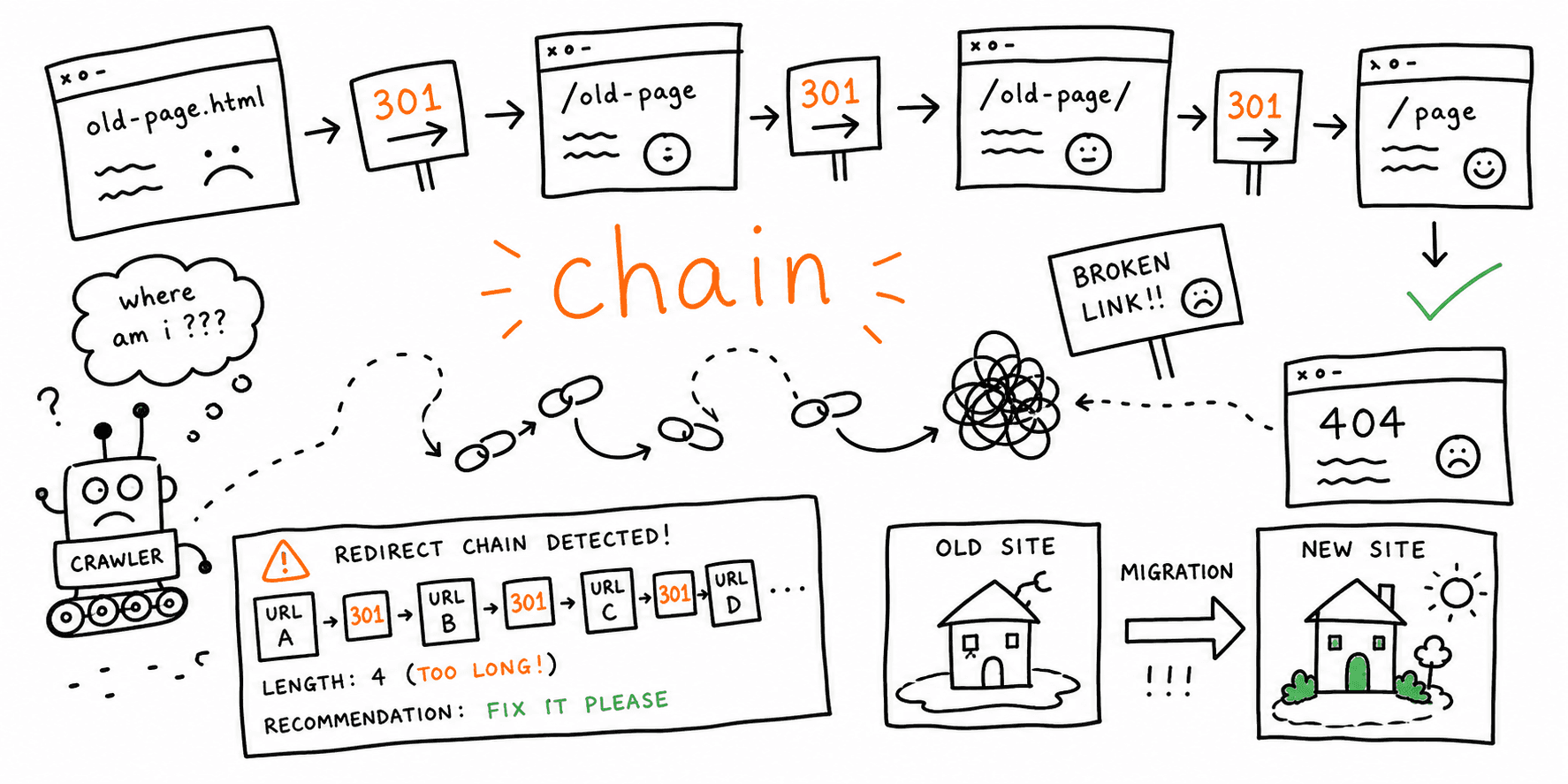
2. Creating redirect chains
Example:
old-page -> temporary-page -> final-page
Every extra hop adds latency, wastes crawl budget, and creates more failure points. If the final destination is known, redirect straight to it.
If you need a dedicated workflow for this problem, read How to Find Redirect Chains After a Website Migration.
3. Sending every retired URL to the homepage
This is usually lazy mapping, not a real redirect strategy. Search engines and users expect the closest relevant match, not a generic catch-all.
Fix:
- map old URLs to the closest equivalent page
- use
410or a clean404when no relevant replacement exists - avoid treating the homepage as a dumping ground
4. Keeping internal links pointed at old URLs
Even if the redirect works, your own site should link directly to the final canonical URL.
Fix:
- update nav, content links, breadcrumbs, and XML sitemap entries
- remove internal references to legacy URLs
5. Ignoring the final response
A "working redirect" is not enough if the final target returns 404, 500, or another redirect.
Fix:
- validate the full chain
- confirm the final target is the intended page
- check that the final page returns
200
15-minute redirect QA before launch
Use this sequence before and after any redesign or migration:
| Step | What to check | Pass condition |
|---|---|---|
| 1 | Homepage canonical redirect | One hop to the final canonical host/protocol |
| 2 | Top revenue pages | Old URLs land on the closest equivalent new pages |
| 3 | High-traffic blog posts | No chains, no 302s on permanent moves |
| 4 | Removed pages | Relevant replacement or intentional 404/410 |
| 5 | Final responses | Target pages return 200 |
Run the Redirect Checker on:
- old top-traffic URLs
- old high-authority backlinks pages
- navigation pages
- template pages such as product, blog, category, and service URLs
301 vs 302: what to do when you are unsure
Ask one question:
Will the source URL return as the main destination in the near future?
If the answer is:
- yes: use
302or307 - no: use
301or308
If the answer is "maybe later" but nobody owns the rollback and there is no date, that usually means the move is effectively permanent.
FAQ
Is 301 always better than 302 for SEO?
No. A 301 is better for a permanent move. A 302 is correct for a temporary move. The wrong choice is using a temporary redirect for a permanent situation.
Should I use 307 and 308 instead?
For most normal website page redirects, 301 and 302 are still the most common choices. Use 307 and 308 when preserving the original HTTP method matters.
How long is "temporary" for a 302?
There is no magic SEO-safe duration. What matters is intent and reality. If the move becomes ongoing with no defined end, treat it as permanent and change it.
Do I still need to update canonicals and internal links if redirects are in place?
Yes. Redirects are not a substitute for clean internal architecture. Canonicals, links, and sitemap URLs should point directly to the final target.
Final rule
Choose the redirect type based on the actual business intent, not what was easiest during staging.
- permanent move:
301 - temporary move:
302 - best implementation: one hop, relevant target, final
200, updated internal links
If you are about to relaunch or migrate, validate the redirect map with the Redirect Checker, then run the Website Launch Checklist and Technical SEO Audit guide before you call the work finished.